

Hybrid Workspaces in India: What AV Systems Are Actually Needed?


The shift to hybrid workspaces in India has left many organizations scrambling to figure out what AV systems they actually need. From Mumbai startups to Bangalore tech giants, companies are discovering that their old conference room setups just don't cut it when half the team is working from home.
This guide is for IT managers, facility heads, and business owners who need practical answers about hybrid workspace technology. Whether you're running a 20-person agency or managing a 2,000-employee corporation, you'll get clear direction on building AV systems that actually work for your hybrid teams.
We'll start by looking at how different Indian industries are handling the hybrid transition and what lessons you can learn from their experiences. Then we'll break down the specific AV equipment requirements that make remote collaboration smooth and productive. Finally, we'll explore budget-smart solutions for SMEs alongside the advanced technologies that larger companies are using to stay competitive.
Current State of Hybrid Work Adoption Across Indian Industries

Remote Work Statistics and Growth Trends in Major Indian Cities
The hybrid work revolution has swept across India's metropolitan landscape. Recent data shows that 73% of IT companies in Bangalore have adopted hybrid models, while Mumbai's financial sector reports 68% adoption rates. The numbers paint a clear picture – remote work is the new normal.
The growth trajectory has been remarkable. From barely 12% pre-2020 to current levels exceeding 60% in major cities, the shift represents one of the fastest workplace transformations in Indian corporate history. Employee surveys consistently show that the majority prefer hybrid arrangements over traditional office setups, creating pressure on organizations to adapt or risk talent attrition.
Industry-Specific Hybrid Work Implementation Challenges
Information technology companies face unique hurdles despite being hybrid work pioneers. Collaboration across global time zones demands sophisticated AV infrastructure, while maintaining code security through remote connections poses ongoing challenges. Many IT firms struggle with bandwidth limitations affecting video conferences, particularly when multiple team members join from residential areas with inconsistent internet connectivity.
Financial services grapple with regulatory compliance requirements that restrict remote access to sensitive systems. Banks and insurance companies report difficulties in maintaining audit trails and ensuring data privacy while enabling flexible work arrangements. The challenge intensifies when dealing with customer-facing roles that traditionally required physical presence for document verification and signature collection.
Manufacturing sectors face the steepest learning curve, with production floor supervision and quality control requiring physical oversight. Companies like Mahindra and Tata Motors have innovated by implementing IoT sensors and remote monitoring systems, but the transition remains complex and costly.
Healthcare organizations struggle with patient privacy regulations and the need for hands-on care, leading to hybrid models primarily for administrative functions. Educational institutions face similar constraints, with practical training and laboratory work requiring in-person attendance.
Essential Audio-Visual Infrastructure Requirements for Seamless Collaboration

High-Definition Video Conferencing Systems for Crystal Clear Communication
Video quality makes or breaks remote meetings, especially when team members are scattered across different cities. In India's hybrid workspace environment, investing in 4K or at least 1080p cameras becomes non-negotiable. The difference between a grainy 720p feed and crisp 4K video affects how colleagues perceive professionalism and engagement levels.
Modern conferencing systems should include wide-angle lenses that capture entire meeting rooms without cutting off participants. Auto-tracking cameras that follow speakers around the room create more natural interactions for remote attendees. COLCOM offers these features specifically designed for Indian office environments.
Smart framing technology automatically adjusts the camera view based on who's speaking and where they're sitting. This eliminates the awkward moments when half the team disappears from view or when someone has to repeatedly ask "Can you see me?" during important presentations.
Professional Audio Equipment to Eliminate Background Noise and Echo
Poor audio ruins meetings faster than any other technical issue. Background conversations, traffic noise from busy Indian streets, construction sounds, and air conditioning hum create constant distractions that derail productive discussions.
Ceiling-mounted microphone arrays or boundary microphones placed strategically around conference tables capture voices clearly while filtering out ambient noise. These systems use beamforming technology to focus on active speakers and suppress sounds coming from other directions.
Echo cancellation becomes crucial in rooms with hard surfaces, common in Indian office buildings. Without proper acoustic treatment, voices bounce off glass windows, concrete walls, and tile floors, creating a confusing audio environment for remote participants. Digital signal processors (DSPs) automatically adjust audio levels and eliminate feedback loops.
Wireless microphone systems offer flexibility for larger meeting spaces or training rooms. Handheld, lapel, or headset microphones ensure every participant can be heard clearly, regardless of where they're sitting or standing.
Interactive Display Solutions for Enhanced Presentation Capabilities
Traditional projectors and whiteboards feel outdated in modern hybrid workspaces. Interactive displays transform how teams collaborate, whether they're sharing ideas during brainstorming sessions or presenting quarterly results to stakeholders.
Touch-enabled displays ranging from 65 to 86 inches provide ample screen real estate for detailed presentations and collaborative work. Multiple people can write, draw, or manipulate content simultaneously, making meetings more engaging for both in-person and remote participants.
Digital whiteboarding applications integrated with displays enable real-time collaboration. Teams can sketch out ideas, create mind maps, or annotate documents together. These sessions get saved automatically and shared with remote team members who couldn't attend.
Display Size | Recommended Room Size | Typical Use Cases |
55-65 inches | Small meeting rooms (6-8 people) | Team huddles, client calls |
75 inches | Medium conference rooms (10-12 people) | Department meetings, presentations |
86+ inches | Large boardrooms (15+ people) | Company-wide meetings, training |
Advanced AV Technologies Transforming Large Corporate Hybrid Workspaces
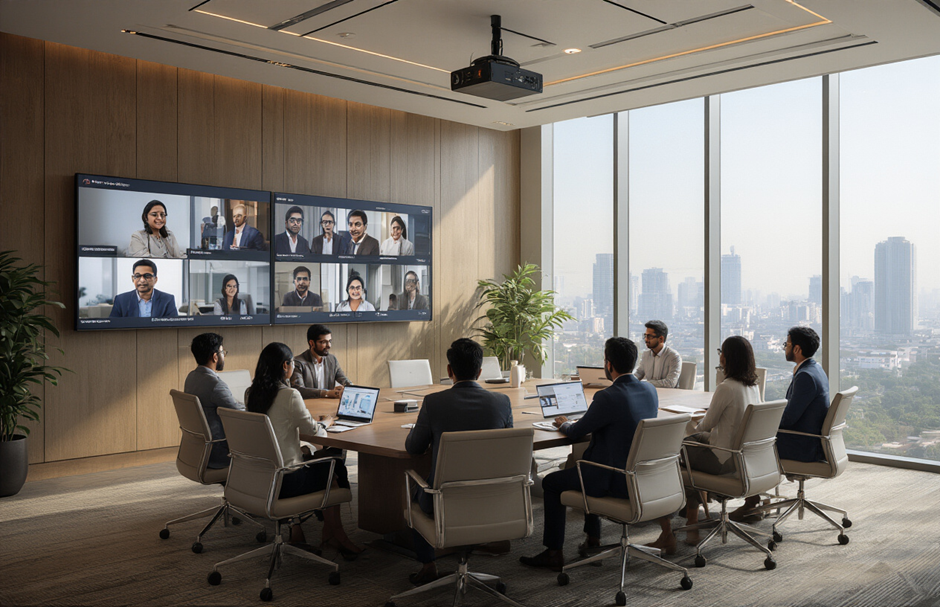
Touch-Enabled Collaboration Boards for Real-Time Brainstorming
Interactive displays have evolved from simple whiteboards to sophisticated collaboration platforms. Companies across Bangalore and Mumbai are installing 75-86 inch touch-enabled boards that support multi-user interaction, allowing both in-room and remote participants to contribute simultaneously to brainstorming sessions.
These boards integrate seamlessly with Microsoft Teams, Zoom, and Google Workspace, enabling real-time annotation, document sharing, and collaborative editing. Participants can use touch gestures, styluses, or even their smartphones to interact with content. The boards save all annotations and changes automatically to cloud storage, making post-meeting follow-ups effortless.
Integrated Room Booking Systems With AV Controls
Smart room management systems are becoming essential for large corporations managing multiple meeting spaces. These platforms combine room scheduling with AV system control, allowing employees to book rooms, adjust lighting, set temperature preferences, and configure AV equipment from a single interface.
The systems typically feature wall-mounted tablets outside each room displaying real-time availability, upcoming meetings, and quick booking options. Inside the room, users can control cameras, microphones, displays, and conferencing software through the same interface. This eliminates the confusion and technical difficulties that often plague hybrid meetings.
Best Practices for Maximum ROI on AV Investments

Pre-Installation Space Assessment and Acoustic Planning
A thorough space assessment forms the foundation of any successful AV deployment. Start by mapping your workspace layout and identifying key collaboration zones. Measure room dimensions, ceiling heights, and natural lighting patterns to determine optimal equipment placement. Indian office spaces often feature open-plan designs with varying acoustics, making sound management critical. COLCOM provides a full consultancy that assesses your objectives, budget, and needs before crafting and implementing a plan tailored to your requirements.
Consider sound-dampening solutions like acoustic panels or strategic furniture placement. Document power outlet locations and network connection points to avoid costly rewiring during installation.
Create a detailed floor plan highlighting camera angles, microphone pickup zones, and display visibility from various seating positions. This planning phase typically saves 20-30% on installation costs by preventing equipment repositioning later.
Employee Training Programs for Optimal Equipment Utilization
Equipment training directly impacts your AV investment returns. Develop role-specific training modules covering basic operations like joining meetings, sharing screens, and troubleshooting common issues. Many Indian companies overlook this step, leading to underutilized, expensive equipment.
Design hands-on workshops where employees practice real scenarios. Include mobile app tutorials since most hybrid workers manage meetings from smartphones. Track usage analytics to identify knowledge gaps and adjust training accordingly. Regular refresher sessions keep skills sharp as technology evolves.
Maintenance Schedules to Ensure Long-Term Performance Reliability
Proactive maintenance prevents costly breakdowns and extends equipment life in India's challenging climate conditions. High humidity and dust require more frequent cleaning than typical manufacturer recommendations suggest. Establish weekly visual inspections and monthly deep cleaning routines.
Create maintenance checklists covering:
Camera lens cleaning and focus adjustment
Microphone sensitivity testing
Cable connection verification
Software update installations
Air filter replacement for projection systems
COLCOM provides a total maintenance service, as well as products and installation, that ensures that your equipment remains in top condition always.
Integration Strategies with Existing IT Infrastructure
Seamless integration with current systems maximizes AV investment value. Audit existing network capacity before installation, as AV systems consume significant bandwidth. Many Indian offices operate on legacy networks requiring upgrades for optimal performance.
Work closely with IT teams to configure firewalls and security protocols. Video conferencing platforms need specific port configurations that might conflict with existing security policies.
Standardize AV platforms across all locations to simplify management and reduce training complexity. Single sign-on integration with existing directory services streamlines user access while maintaining security protocols. Regular compatibility testing prevents issues when software updates occur.
The shift to hybrid work in India has created a clear demand for smart AV investments that actually work for different business sizes and budgets. From basic video conferencing setups that help small teams stay connected to advanced collaboration platforms transforming how large corporations operate, the right audio-visual infrastructure makes all the difference between smooth remote meetings and frustrating technical difficulties.
Success comes down to choosing solutions that match your team's real needs and budget constraints. Start with the essentials – reliable internet, quality cameras, and clear audio systems – then build up your capabilities as your hybrid work model evolves. The companies getting the best returns are those focusing on user-friendly systems that employees can operate without constant IT support, proving that sometimes the simplest solutions deliver the biggest impact on productivity and team collaboration.
Written By-
Pratheeksha Pradeep
Marketing Intern


